
Modularising Blip: A journey from monolith to modular architecture
April 27, 2026
Published by Mino Rakotolehibe

Introduction
Every iOS app starts the same way: one target, one folder, one place for everything. Developers move fast, ship features, and the codebase grows. For a while, that’s fine. The friction is quiet at first. Then, you make a one-line fix and watch the compiler rebuild the entire app. You search for a utility someone wrote before and find three versions scattered across different folders. Before long, it’s everywhere. This is the journey of how we modularised Blip - what was there before, what changed and what we learned.
1. What is Blip?
Blip is BrightHR's time and attendance app. It lets employees clock in and out using a QR code or geo-fencing, and gives managers a real-time view of who's in. It's not a standalone product. It lives inside the BrightHR ecosystem, sharing authentication, design, and infrastructure with the wider suite. Serving multiple territories.
2. Where we started: the monolith app
Blip started as a single Xcode target. All the code (UI, business logic, networking, and data) lived together in one place, organised by feature folders. There were no packages, no enforced boundaries. Just folders. The architecture was MVVM with UIKit. Each screen had a ViewController responsible for rendering the UI, backed by a ViewModel that handled presentation logic, and an Interactor that owned the business logic and called into services to fetch data.
So, what made it a monolith?
Three things:
-
Single target: everything compiled together as one unit. One change anywhere could break anything.
-
No enforced boundaries: any file could import and use any other. The compiler had no opinion on this. Nothing stopped it.
-
Single dependency graph: all dependencies came through CocoaPods into one shared project. Every target had access to everything.
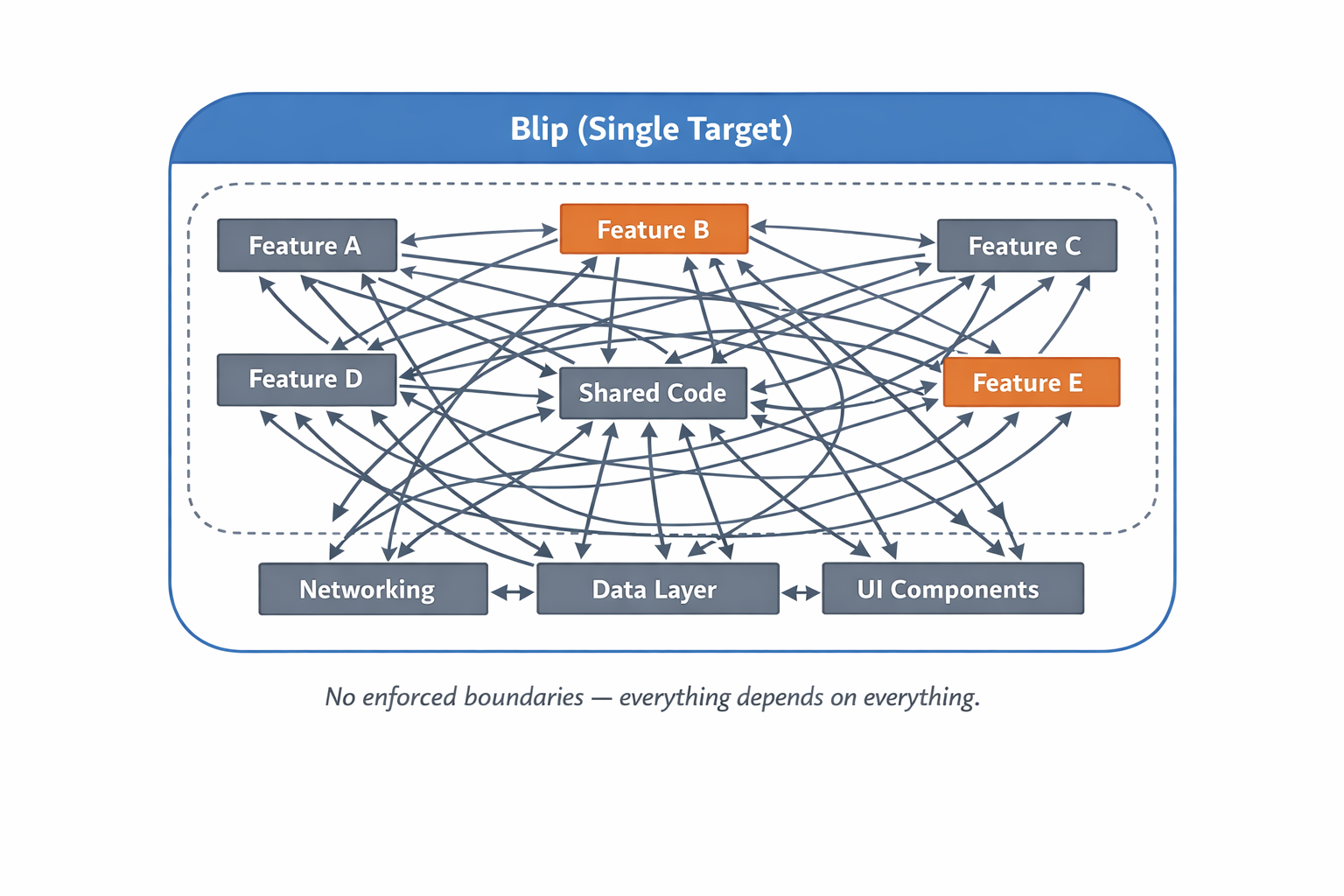
The folder structure gave the illusion of separation. But folders are just organisation — they don't enforce anything. The monolith wasn't about how the code was arranged; it was about the fact that nothing could stop one part of the app from depending on another. And as the app grew, that became a problem.
3. The decision to modularise: “why now” moment
It wasn’t one thing. It was a pile of inconvenience that quietly built up until it couldn’t be ignored.
- Build times crept up. Because everything was a single target, every change, no matter how small, meant the compiler had to rebuild the entire app.
- Duplication started appearing. With no enforced boundaries and no shared packages, different developers independently solved the same problems. We had three separate String extensions doing the same thing.
- The team started adopting TCA. As we moved to TCA for newer features, the argument for modules made itself. TCA’s model of scoping and splitting features maps naturally to separate modules.
4. A place for Everything: How we structure Blip to become modular
The modular structure lives in Blip package, an internal Swift package. The philosophy was layered: lower-level modules know nothing about higher-level ones and the dependency graph flows in one direction.
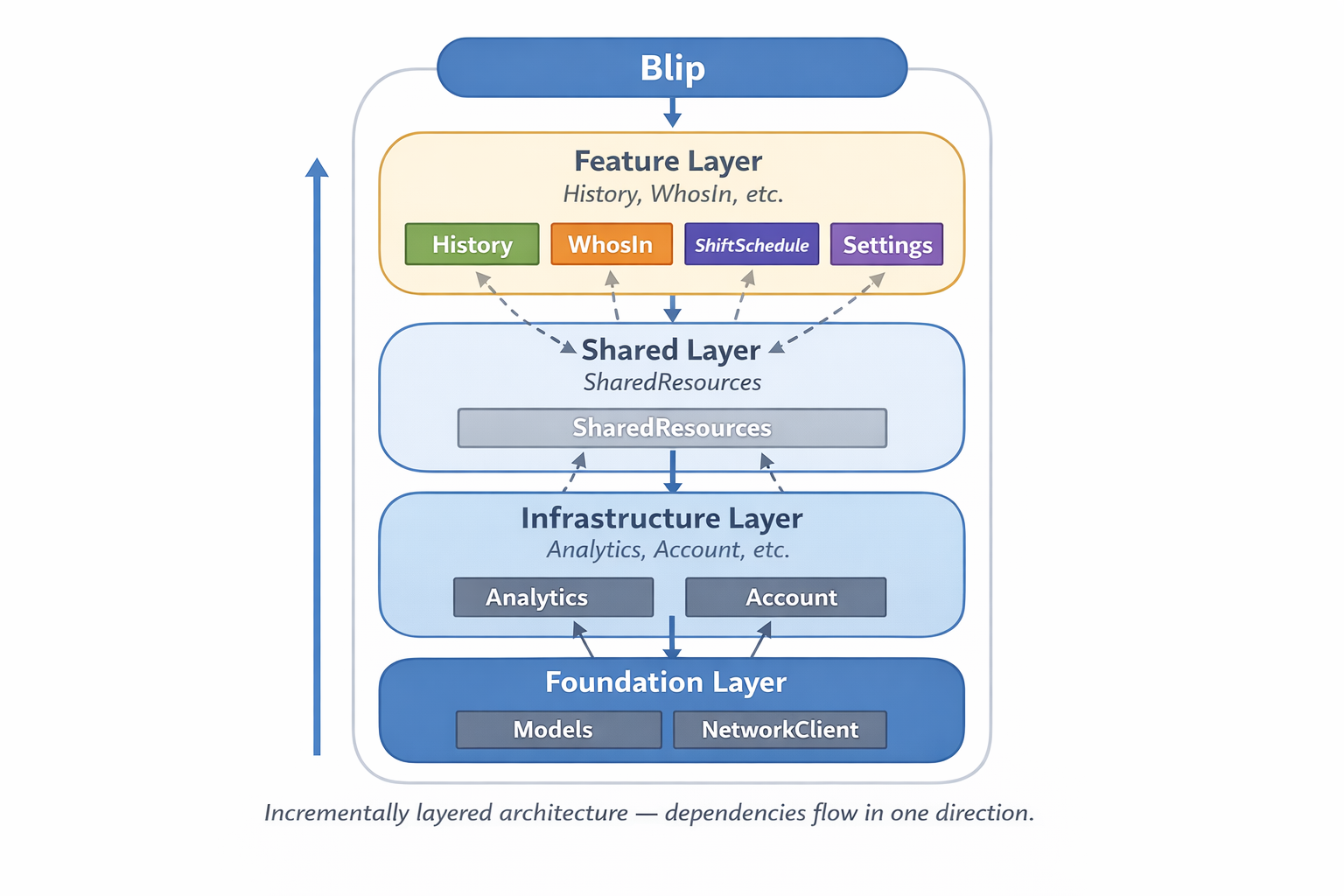
There are four layers.
Foundation. The base everything is built on. It contains the core types the rest of the app reasons about: Employee, Shift, UserProfile. It also owns the HTTP layer – the network client used across the app.
Infrastructure. Modules that sit above Foundation but below features. They provide cross-cutting capabilities that almost every feature needs: analytics for event tracking for example.
Shared. This is where common UI components, extension and utilities live.
Feature. The top of the stack and the user facing layer. Each module represents a self-contained product area: History, Who’s In, Adjustment requests, etc. It owns its own logic, UI, and assets.
Along the way, while we modularised the app, we also took the opportunity to update our tech stack, adopting SwiftUI and TCA.
So, what exactly are the main differences with the legacy monolith structure we’ve had and the new modular one?
| Monolith | Modular |
|---|---|
| Everything lives in one build target — History, Adjustment Requests, Home, Settings all compiled together | Features live in separate modules — History, WhosIn are all isolated |
| Features could reach into each other freely — an interactor in History could import a class from Home with nothing stopping it | Cannot reach into each other — the compiler physically prevents it |
| Shared code had no formal home — helpers and utilities scattered across Shared classes, with no enforced boundary | Shared code has a designated home — SharedResources is the one place for cross-feature components |
| One test suite (blipTests) covering everything — slow, no isolation | Each module has its own test target — test only what changed, in seconds |
| One dependency graph — a change anywhere could trigger a full recompile | Incremental compilation — change History, only History recompiles |
| No explicit public API — every type was visible to every other type by default | Explicit public surfaces — internal types stay internal; the module's API is a conscious decision |
5. The impact on our codebase and testing
Modularising didn’t just change where files lived. It changed what the compiler knew, and how fast it could respond.
- Every module has now a front door. Previously, there was no concept of “internal” or “public”. Everything could be used and seen. Now, other modules can only interact with what you’ve deliberately exposed.Think of it like a restaurant. Customers interact with the menu – the front door. They order; they get food. They don’t walk into the kitchen grabbing ingredients themselves. “public” types are the menu. “internal” types are the kitchen. The kitchen can be messy; the customers will never interfere with it.In the monolith, there was no kitchen. Everything was reachable and anyone could grab anything.
- Changes to one feature no longer rebuild the whole project. In the monolith, a one-line fix meant recompiling the entire app. With separate modules, the compiler knows exactly what depends on what. Everything else is untouched. Less waiting, less frustration.
- Tests became faster and more focused. Previously, all tests lived in a single BlipTests target. To run HistoryTests, you’d build and run the whole suite. Now each module has its own target. You can test one module in isolation in seconds.
- Clearer ownership, fewer conflicts. Because modules compile independently, a developer can work on their own feature without affecting anyone else’s. Each module has a clear boundary. In the monolith, ownership was fuzzy because everything was reachable from everywhere.
6. What we'd tell ourselves on day one: lessons learned
- TCA and modularisation go hand in hand. TCA’s model of scoping and isolating features pushes you naturally toward separate modules.
- SharedResources will become a magnet. Take good care of it. Every time something doesn’t have an obvious home, it ends up in Shared. Left unchecked, it becomes the new monolith. Be deliberate about what belongs there.
- Package.swift is your source of truth. It defines what exists, what’s visible, and what depends on what. Keep it clean and reviewed like any other critical file.
- Migration is slow. That’s fine. You don’t need to move everything at once. Migrate feature by feature.
- The investment pays off. Faster builds, clearer ownership, isolated tests. The codebase you have six months in is noticeably easier to work in than the one you started with.


Registered Office: Bright HR Limited, The Peninsula, Victoria Place, Manchester, M4 4FB. Registered in England and Wales No: 9283467. Tel: 0844 892 3928. I Copyright © 2024 BrightHR