
Beyond Roles: How BrightHR Designed a Flexible Permission System for HR
April 2, 2026
Published by Maysa Bashraheel

Most developers, when asked to "add some permissions," reach for the simplest tool available: roles. Give someone a role, and that role comes with a fixed set of things they can see and do.
But real-world software rarely stays simple. HR platforms face a genuinely tricky problem: people in the same role don't always need the same access. A 'Manager' might oversee a team of five, or they might run payroll for five hundred. An 'Admin' might handle recruitment but should never touch salary data. The moment you recognise that, you understand why BrightHR's permission system goes beyond a role lookup. It separates who you are from what you can do.
This post covers how that system works and the engineering decisions that shaped it.
The Problem: Roles Are a Starting Point, Not a Solution
Imagine you're building an HR platform. You have three types of users:
- Admin: full access to manage the company
- Manager: access to their team
- Employee: access to their own data
At first, that covers most scenarios. But customers will soon start asking questions like:
"Can I give this manager access to payroll, but only for their direct reports?"
"Can I let this employee view everyone's contract info, but not edit it?"
"Can our HR officer see sensitive medical information, even though they're just an Employee?"
These are core HR workflows, not the kind of thing you can patch around and so, the system needs to answer them cleanly.
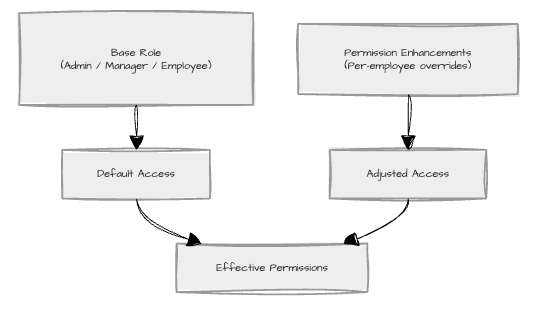
BrightHR's answer is a two-layer model:
- A base role (Admin, Manager, Employee) that sets the baseline of what a person can do
- Permission enhancements layered on top of that base, granting or adjusting individual feature access on a per-employee basis
Think of the base role as the floor and permission enhancements everything you build on top of it.
Architecture at a Glance
Before the data shapes and the reducers, it is worth seeing what this looks like from the admin's perspective.
An HR admin opens Settings, navigates to a Permissions tab, and sees a table of every employee: their name, role, and a link to edit their individual permissions. They click into "Bob," and get a dedicated page showing every feature Bob can access (contracts, salary, payroll, medical info). For each one, they can toggle it on or off, choose who Bob can access it for (everyone, just his direct reports, or a hand-picked list), and save. If they navigate away without saving, the system asks if they're sure.
That is the product. Everything below is how it works under the hood.
There are two top-level surfaces: a list view of all employees with their current permission state, and a per-employee editor that opens on its own route. Three patterns hold that arrangement together.
Data-fetching boundaries. Every page is divided into a container that owns data fetching (React Query, role lookups, cache management) and a presentational component that owns the rendering. The Employee Table, for instance, knows nothing about how its rows were fetched. The trade is one extra file per page in exchange for components you can render in tests with a single mock prop and re-renders that stop at the row level instead of cascading through the whole page.
Router-based navigation. Each employee's permission editor is its own route, not a modal. That means the editor never has to load detailed permission data for everyone up front, the back and forward buttons just work, and a deep link to a specific employee's permissions is a shareable URL. The cost is one well-known cache hazard: returning to the list view has to show the latest saved state. React Query's invalidation handles that: the list query is invalidated after a successful save, and the next mount refetches.
Optimistic, batched edits. Inside the editor, changes are not pushed to the server on every click. They accumulate locally, the UI shows which employees are dirty, and a single save commits the diff. The trade-off is concurrent edits across tabs or devices: that is handled at the API boundary with row versions, so a stale write loses cleanly instead of overwriting newer data.
Keep those three in mind. Everything below is what falls out of them once you start zooming into the editor.
Breaking Down the Architecture
Feature Keys: A Contract with the Backend
Every permission in the system is identified by a feature key; a string constant that the frontend and backend agree on as a strict contract. Change one without coordination and things break. In practice, this is a shared file listing every permission by name: ContractAndAnnualLeave, Payroll, SalaryInformation, BankDetails, MedicalInformation, and so on. Both sides of the system reference the same list, so nothing falls out of sync.
Permission Assignments: What You Have Access To
When a user's permissions are customised, the system stores a list of permission assignments. Each assignment ties a feature key to an access option and, optionally, a list of specific target employees. In plain terms: "Bob can view salary information for these three people." In code, that looks like:
Loading Code...Rather than a simple on/off switch, a permission can be set to one of several scope options:
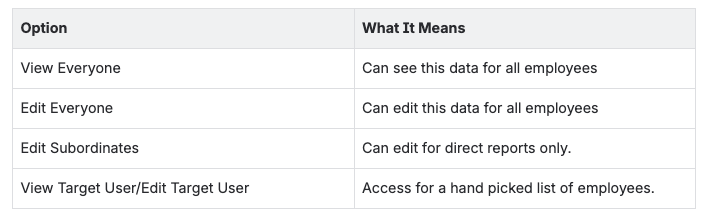
What makes this model useful is that it answers a harder question than "can you access this?" It answers "who can you access it for?” A manager with payroll access for their direct reports is a fundamentally different thing from a manager with payroll access for the whole company, and the data shape reflects that.
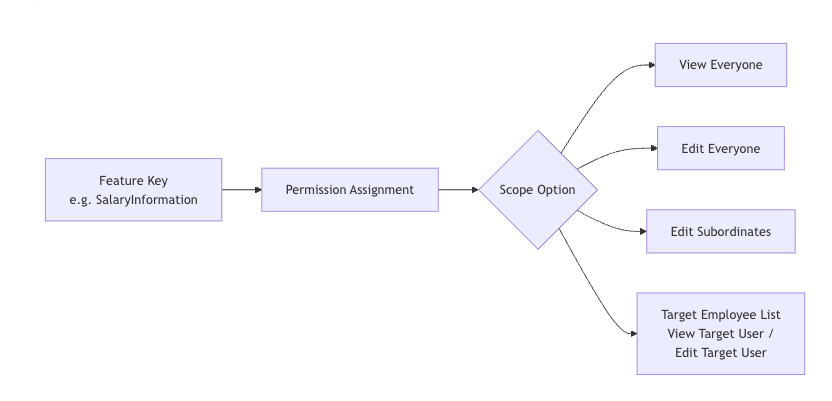
The diagram above shows how a single feature key fans out into scope options: from a broad "view everyone" down to a hand-picked list of specific employees.
An Adapter Between Two Vocabularies
The backend and the UI do not, in fact, speak quite the same language. The backend distinguishes between ViewEveryone and ViewTargetUsers (the same option, but scoped to a specific list of employees). The UI deliberately does not. From a user's point of view, you pick "View Everyone" and then optionally narrow it to a list. Picking a list should not silently change which radio button you appear to have selected.
So a thin adapter sits between the wire format and the editor's state:
- On load, ViewTargetUsers is normalised to ViewEveryone with the target IDs stored on the side.
- On save, the presence of target IDs flips the option back to ViewTargetUsers.
The payoff is a UI whose controls behave predictably; the risk is a mapping bug silently saving the wrong shape, which is why the adapter has tests in both directions and is one of the few places in the codebase where round-tripping is asserted explicitly. The lesson generalises: when the API's model and the user's mental model diverge, do not force one to absorb the other in-place. Translate at the edge.
Permission Definitions: Declarative by Design
Rather than scattering permission logic across components, BrightHR defines permissions in dedicated definition files. Each definition is a data object describing the permission's display name, description, and a getConfig function that returns the UI config for the current user type.
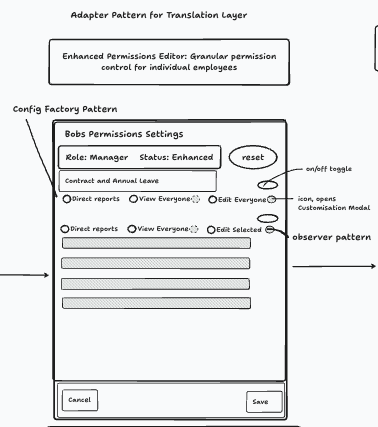
The mockup above shows one employee's permission editor. On the left: the UI the admin sees (toggles, radio buttons, scope selectors). The annotations point to the patterns working behind the scenes. What looks from the outside like one editor is, internally, a single generic component rendering whatever a definition tells it to render. The interesting work is in the definitions themselves, and three classic patterns are doing it.
Strategy, via getConfig. ("Strategy" means: instead of one big if/else deciding how every permission behaves, each permission carries its own rules.) Each definition encapsulates its own rule for how it should behave for a given user type. The host component does not branch on userType anywhere; it asks the definition.
Factory, via createDefinition and option helpers. ("Factory" here means: small helper functions that exist purely to give developers autocomplete and catch typos at build time, not at runtime.) Permission definitions are deeply nested objects; these helpers make them safe to write without adding any runtime cost.
Config-driven rendering. The component reads a permission's config and renders accordingly. Adding a new permission does not touch the renderer; it adds a definition. Adding a new behaviour rule ("this permission becomes uneditable when X is enabled") does not touch the renderer either; it changes what getConfig returns.
Here is a simplified example. The salary permission checks whether payroll is already enabled for this user, and if so, locks itself to "direct reports only":
Loading Code...Notice how getConfig receives current assignments rather than the assignments themselves. That is intentional. It lets a definition's rule depend on the current state of other permissions without coupling the definition to a static snapshot. Salary's behaviour quietly tracks payroll's state, and the component renders accordingly. The cost of all this indirection is real: debugging "why is this toggle disabled?" means jumping to the definition file. The benefit is that every answer to that question lives in exactly one place per permission.
State Management: Flux Without Redux
Editing permissions involves dozens of toggles, scope dropdowns, and changes that ripple into other changes. There are essentially two ways to manage that. Spread useState across every control and pray, or impose a single direction of flow. This system uses the second.
This is Flux-style architecture built from React primitives. ("Flux" means: every change flows in one direction, action → reducer → new state → UI update, rather than scattered two-way updates.) No Redux, no Zustand, just useReducer and discipline. A user action becomes a dispatched action; the reducer returns a new state; the UI re-renders. State is never mutated in place, and there is exactly one path through which it can change.
The reducer handles only three operations: set (load from server), update (change a permission), and remove (delete a permission). That economy is deliberate: it means any code path that produces a state change has to express itself in one of those terms, and the reducer becomes the single place to look when something goes wrong.
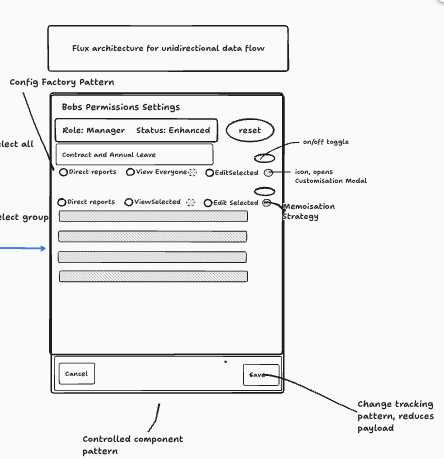
The diagram above shows two things: the editor itself (left) with its patterns annotated, and the save flow (right) showing how local changes are compared against the server, transformed, and sent as a single request.
A few patterns lean on the reducer:
- Controlled components everywhere. Every input (switches, radios, checkboxes) takes its value from state and dispatches on change. Permissions can update without direct user input (a dependency rule fires, the reducer runs, the UI follows), and that only works if no input is quietly holding its own state on the side.
- Dirty tracking via a flag, saving via a diff. A hasChanges boolean is set to 'true' whenever the reducer dispatches an update or remove, and reset to false on successful save. The navigation guard fires when this flag is true. However, the save path is smarter: it diffs the local reducer state against the React Query cache and only sends the actual changes (adds, updates, deletes). The flag tells you whether to save; the diff tells you what to save.
- Targeted memoisation. The editor renders a lot of controls at once, and most state changes affect exactly one of them. React.memo on the individual permission control, with a custom equality check on its own assignment, stops a single toggle from re-rendering the whole list. Used sparingly (most components don't need it), but here, with this many rendered at once, it is the difference between speed and lag.
The cost of this whole arrangement is more setup than dropping useState everywhere, and no Redux DevTools to peer at. The payoff is that the answer to "where did this state come from?" is always the same five lines of reducer code.
Reactive Permissions: An Observer on Every Definition
Some permissions are logically linked. Granting a manager payroll access changes how the system treats salary information, the payroll number, and bank details: those become payroll-driven, defaulting to the manager's direct reports.
This is a textbook case for the observer pattern ("observer" means: one thing watches another and reacts when it changes, without the watched thing knowing about its watchers). That is essentially what changed assignments is. Every definition can register interest in any permission change; when the reducer runs, every observer is notified; each one decides for itself whether the event matters and what to do about it. Salary listens for payroll. Bank details listens for payroll. Payroll number listens for payroll. The thing being observed has no idea it is being observed.
There are two halves to a permission's reactivity. The static half is when payroll is on, salary's config locks the toggle and defaults the option to direct reports. The dynamic half fires whenever any assignment changes and clears stale overrides so the new defaults take effect. In plain terms: "if payroll just got enabled, wipe any custom salary override so the default (direct reports) kicks in."
Loading Code...The split is deliberate. the config describes what the UI should look like right now; the changed assignments handles what state needs to change in response to an event. Keeping each rule on the definition that owns it means salary's behaviour-when-payroll-changes lives next to everything else about salary, instead of being scattered across components.
The well-known hazard with observers is cascade: A dispatches to B, B's observer fires and dispatches to C, C's observer fires and… The mitigation here is convention-based rather than mechanical. Observers self-filter by feature key: each handler checks event.feature and early-returns if the change is irrelevant. More importantly, observers only ever dispatch remove actions, which are terminal: removing an assignment does not itself trigger further meaningful observer reactions, because there is nothing left for a downstream observer to react to. Every observer-triggered change still goes through the same reducer, so it is visible and traceable rather than hidden in component effects. The sequence diagram below illustrates how a single user action can trigger a chain of updates:
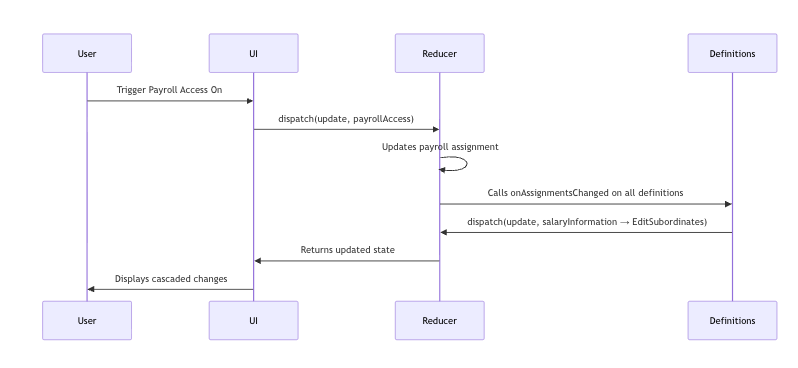
The sequence diagram above shows an example cascade: a user enables payroll, which causes salary information to automatically reset to its default state.
The Challenges
1. Protecting Employees from Losing Access to Their Own Data
One critical rule: an employee must always be able to see and edit their own data. If a manager is configuring another employee's permissions, they should not be able to accidentally remove that employee's access to their own contact details or emergency information.
The naïve fix is conditional logic inside the selection modal: "if the assignee is in the list, disable the checkbox for these permissions." That works for a week. Then a new permission is added, the rule is missed, and an employee silently loses access to their own emergency contacts. A safer approach: make the rules declarative data, and have the modal interpret them.
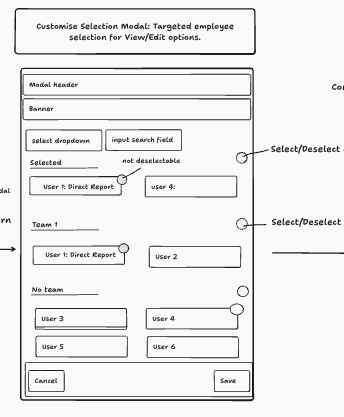
The mockup above shows the selection modal: employees grouped by team, with some pre-selected and locked (because the system protects their access to their own data).
The rules live in a centralised map. Each permission declares how the assignee (the employee whose permissions are being edited) should be treated in the selection list: always shown and locked, freely selectable, or hidden entirely.
Loading Code...Each permission gets one entry declaring its View and Edit behaviour. Adding a new rule is a single line, not a change to modal logic.
The selection modal (one component, reused across every permission type) calls to decide whether the assignee can be deselected, whether they should be excluded from the list entirely, and which checkboxes should be locked. The modal does not change when rules change.
That modal is also worth a closer look on its own, because it carries another pattern that quietly does a lot of work: a local state buffer. When it opens, it copies the current selection into its own state. The user can freely add and remove people. Clicking Save commits the buffer to the parent via a callback; clicking Cancel discards it and closes. The parent state is the source of truth on mount; after that, the modal owns its own working copy until the user explicitly commits. Without this, Cancel would not actually cancel anything; every checkbox click would already have leaked into the parent.
A question worth sitting with: where would you enforce a rule like "a user can never lock themselves out"? In the UI? The reducer? The API? We picked the definition layer for the same reason getConfig lives there: one place to look when something behaves unexpectedly.
2. Full Audit History
For an HR system, knowing who changed what and when is not optional but often a legal requirement. The service layer records every permission change with enough detail to reconstruct the full history:
Loading Code...Every change is categorised as a 'Reset' (back to role defaults), a 'Patch' (an individual adjustment), or a 'RoleChange' (the base role changed). This makes it possible to reconstruct exactly what any employee was permitted to see at any point in time. Building it from the start, rather than retrofitting it, is what lets HR teams actually answer compliance questions when they come up.
3. Unsaved Change Guards
Any UI where users configure multiple connected settings carries the risk of accidental data loss. Navigate away mid-edit, hit the back button, work gone. The system guards against this with a hook paired with a modal component. The hook watches for navigation attempts (both in-app links and the browser's back/close buttons) and, when unsaved changes exist, shows a modal asking the user to confirm:
Loading Code...It is a small detail, but for an HR admin who has just spent ten minutes carefully configuring permissions for fifteen people; it matters enormously, it's the difference between a system they trust and one they don't.
Conclusion
The BrightHR permission system is what you get when you take domain complexity seriously at the design level, instead of deferring it. Roles being insufficient is not a bug in the design. It is just how organisations work. The interesting engineering happened when the team stopped treating a permission as on or off, and started treating it as something with a scope, a set of options, and a history.
The patterns here (declarative definitions, a centralised reducer, a clean separation between what a role gives you by default and what can be layered on top) are transferable to any system where simple role-based access starts to crack under the pressure of real user needs.
If there is one thing worth carrying away from all of this: when your users start asking "can I make it so this specific person can only see this specific thing for these specific employees?", that is not a feature request to push back on, it's the product growing and it is worth designing for it early.


Registered Office: Bright HR Limited, The Peninsula, Victoria Place, Manchester, M4 4FB. Registered in England and Wales No: 9283467. Tel: 0844 892 3928. I Copyright © 2024 BrightHR